Integration guides
Connect Soundside to your preferred MCP client. All integrations use the same endpoint and auth model — the setup differs by client.
Endpoint
Common setup
https://mcp.soundside.ai/mcpPOST https://mcp.soundside.ai/mcp
Authorization: Bearer <token>
Content-Type: application/json
{"jsonrpc":"2.0","id":"1","method":"tools/list","params":{}}Auth options: OAuth 2.1 (recommended for external clients) or API keys (for first-party integrations). See /docs/auth and /docs/api-keys.
Claude Code
Connect Soundside to Claude
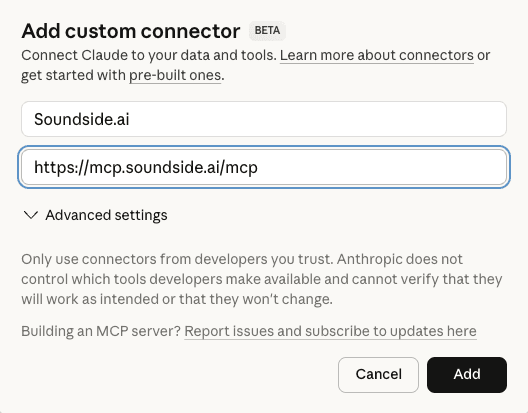
Add Soundside as a custom connector in Claude. Open Settings → Connectors, click Add custom connector, and enter:
Name: Soundside.ai
URL: https://mcp.soundside.ai/mcpClick Add to register the connector. You'll be redirected to authenticate with your Soundside account.
Verify and configure permissions
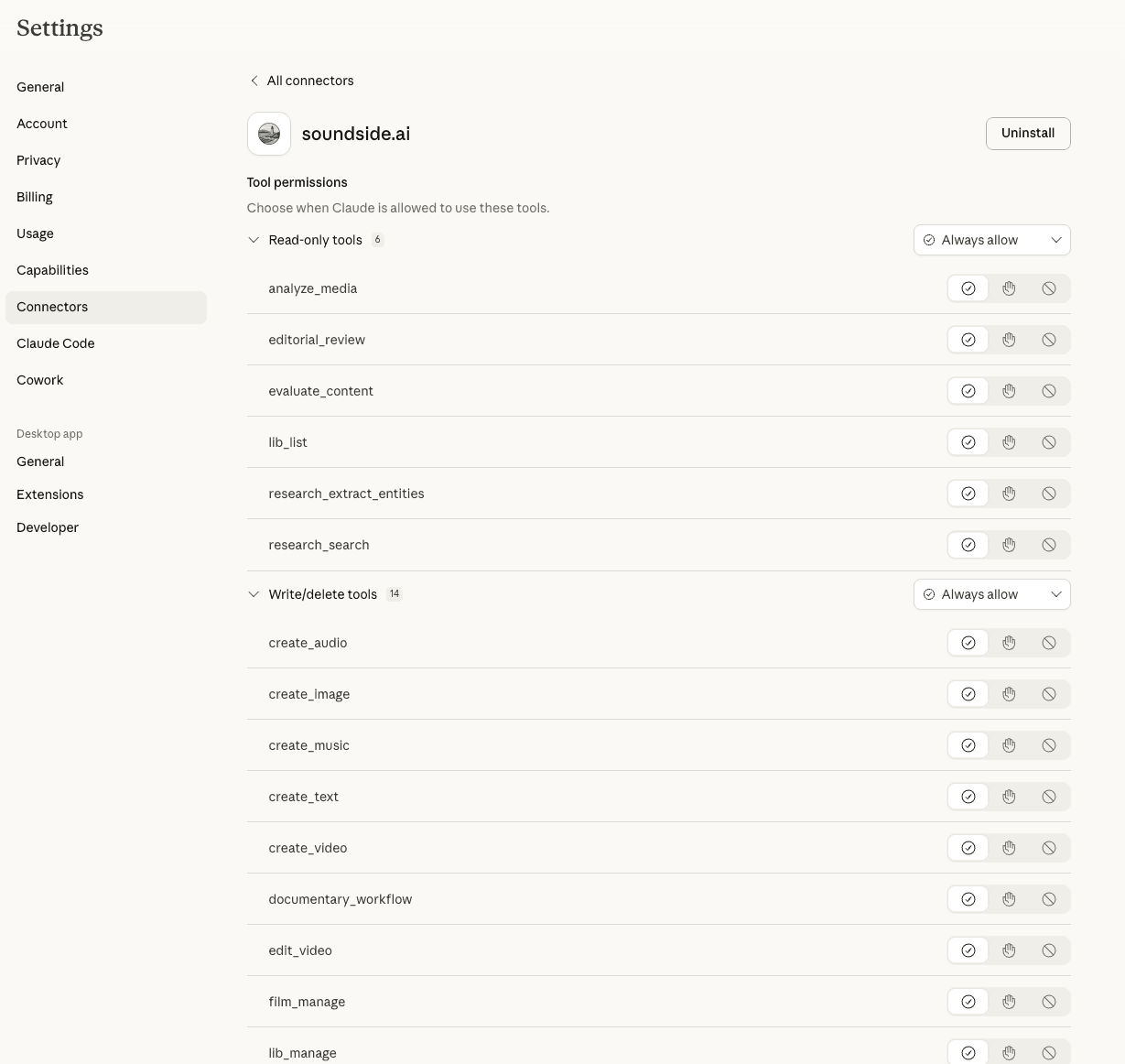
After authenticating, return to Settings → Connectors. You should see soundside.ai listed. Click into it to manage tool permissions:
- • Always allow
lib_listif you want friction-free resource browsing and status checks. - • Ask first for
analyze_media, generation, editing, sharing, and library mutations, because some of those calls create or modify persisted resources.
We recommend Always allow only for the low-risk browsing path at first, then widening access once you're comfortable with how your agent uses the surface.
Try it
Start a new conversation in Claude and try:
Create a cinematic image of a sunset over the ocean with dramatic cloud formations.Troubleshooting
- • Connector not appearing: Verify the exact URL
https://mcp.soundside.ai/mcpand complete the OAuth flow. - • Tool denied: Check permission settings — a tool set to "Never allow" won't execute.
- • Session expired: Reconnect the connector in Settings → Connectors.
- • Credit errors: Check your balance on the billing page.
Anthropic
Anthropic connector guide
Use this setup for Anthropic-compatible environments that support external MCP tools and OAuth-based access.
{
"jsonrpc": "2.0",
"id": "1",
"method": "tools/list",
"params": {}
}Error handling
Handle policy denials (forbidden_client) distinctly from quota denials; policy failures require trust configuration, not retry.
Safe rollout defaults
- • Keep tool lists explicit and minimal at start.
- • Monitor first-call failure rates before widening surfaces.
- • Use project-scoped library operations for least privilege.
OpenAI
OpenAI remote MCP guide
Apply this pattern when your agent runtime supports remote MCP tool connectivity and you want Soundside tools as external capabilities.
POST https://mcp.soundside.ai/mcp
Authorization: Bearer <token>
Content-Type: application/json

{"jsonrpc":"2.0","id":"1","method":"tools/list","params":{}}Error handling
Map retryable and quota headers directly into your retry policy. Avoid blind exponential retries on non-retryable denials.
Recommended launch profile
- • Start with read-only tools in early rollout.
- • Add generation tools once prompt quality and budget controls stabilize.
- • Reserve advanced workflows for explicit operator-approved automations.
OpenClaw
OpenClaw agentic media guide
Connect OpenClaw to Soundside for generation, editing, analysis, and library management with durable managed assets.
create_video: alibaba, creative_freedom, grok, minimax, vertex
create_image: alibaba, creative_freedom, grok, minimax, vertex
create_audio: creative_freedom, grok, minimax, runway, vertex
create_music: creative_freedom, lyria (Creative Freedom is authenticated-credit only)
create_text: grok, minimax, qwen, vertex
edit_video: soundside.ai (21 editing actions)
analyze_media: anthropic, grok, openai, qwen, soundside.ai, vertex
Durable resource pattern
1) Generate media -> receive resource_id
2) Store/organize via lib_manage
3) Reuse resource_id in downstream tools
4) Query status with lib_list for resumed sessions
5) Download only for final delivery or external handoff
This reduces local storage pressure and keeps workflow state durable across sessions.
Execution guardrails
- • Follow
tools/listschemas exactly instead of hardcoding argument assumptions. - • Respect
Retry-Afterandretryableinstead of blind retries. - • Track per-tool success and credit burn to tune routing and approval policies.